It's late November. Your sales team has just closed a deal, and the client is expecting work to start in two weeks.
There's just one problem. Nobody checked with the delivery team.
When the project manager gets the handover, they discover the team is fully booked until January. Sales has already promised a December start, the client has told their colleagues to prepare, and now someone has to explain why the dates have changed.
The contract has been signed, but the project is already off to a difficult start.
This happens more often than businesses would like to admit. And while the immediate problem looks like poor communication between sales and delivery, there's usually something more fundamental going wrong.
Delivery is being brought into the conversation far too late.
Why waiting until 'closed won' is too lateIn many businesses, the sales-to-delivery handover begins when a deal is marked as 'closed won' in the CRM.
An automation might notify the project manager, create a project board or assign someone to schedule the kick-off meeting.
That's useful. But by this point, several important decisions have already been made.
The client has been given a start date. The scope has been agreed. A price has been approved. Someone may even have promised a particular team member or turnaround time.
Now delivery has to work out whether any of those promises are realistic.
Ideally, the delivery team should have had an opportunity to review the proposed work before those commitments were made.
That doesn't mean inviting your project manager to every sales call. It means having a process for checking capacity, reviewing requirements and agreeing dates while there's still room to make changes.
Once the deal is signed, automation can take care of getting the project set up and the right information to the right people.
What a poor handover costs your businessThe consequences go beyond an awkward conversation with the client.
Your salesperson spends time renegotiating dates they thought were settled. The project manager has to chase down information about what was agreed. Delivery starts reshuffling workloads to accommodate a project they weren't expecting.
Meanwhile, the client is rearranging their own plans.
Research from Rocketlane's 2025 State of Customer Onboarding report found that 45% of onboarding teams struggle with siloed tools and information.
It's easy to see how this happens when sales and delivery work in separate systems.
The CRM contains the commercial conversations, the proposal sits in someone's inbox, and the delivery team manages its projects elsewhere. Important details get copied into emails, meeting notes or spreadsheets, often by different people.
Even when everyone is doing their job properly, something can get missed.
The solution starts with deciding what information delivery needs, when they need it and who is responsible for approving the commitments being made.
How to build a better sales-to-delivery handoverThere are five changes we'd recommend, starting before the contract is signed.
1. Check delivery capacity when the proposal is being preparedWaiting until a deal closes to check availability is asking for trouble.
When an opportunity reaches the proposal stage, sales should be able to request a delivery review.
This request should include the expected scope, estimated hours, skills required and preferred start date.
The delivery lead can then check existing workloads and confirm what's realistic.
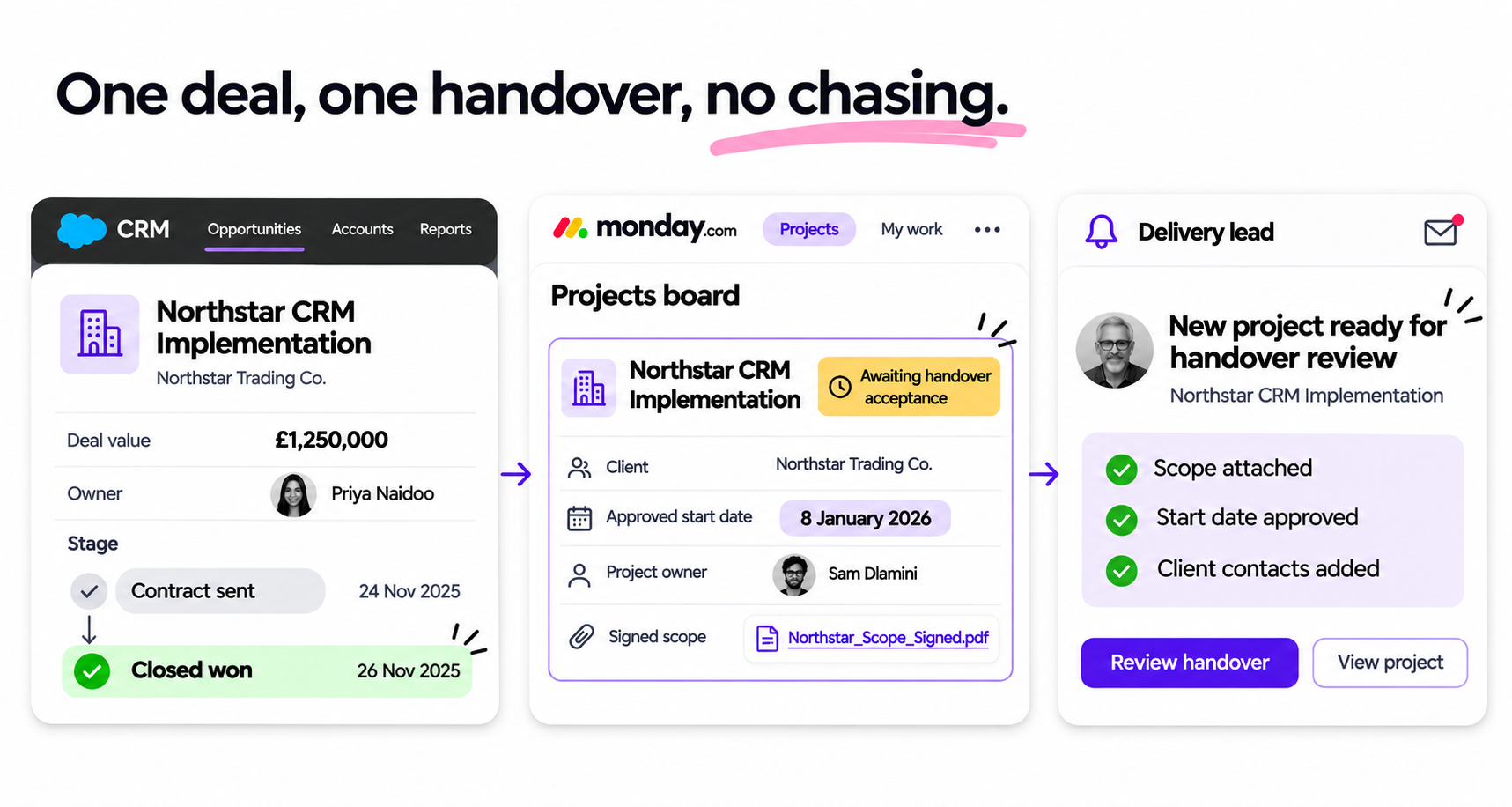
For example, a client might want to start on 1 December, but the team responsible for implementation is already committed to other projects. Delivery can propose 8 January before sales sends the final proposal.
You can automate the request itself. When an opportunity reaches the relevant CRM stage, a provisional capacity request can be created in your project management system.
There's no need to create a complete project for every proposal. A simple request gives delivery enough information to assess the opportunity without filling the project pipeline with deals that may never close.
2. Make start dates subject to delivery approvalA salesperson shouldn't have to guess when a project can start.
Equally, a start date shouldn't be calculated from someone's calendar without considering the work involved.
A project requiring 80 hours of design work needs a different capacity check from one requiring 80 hours spread across several roles.
Tools such as monday.com's Workload Widget can help delivery teams see how work is distributed across people and projects, provided the relevant assignments, dates and effort estimates are maintained.
The delivery lead can use this information to review the proposed work and approve a start window.
That approved date can then be recorded in the CRM for sales to use in the proposal.
You'll also need to account for deals competing for the same available capacity. A provisional booking should have a review date so it doesn't hold resources indefinitely.
3. Bring delivery into complex deals before signatureSome projects need more than a capacity check.
If the work involves several systems, unusual requirements or a tight deadline, the delivery lead should review the proposed scope before the client signs.
This might involve joining the final client call, reviewing the statement of work or checking the implementation assumptions with sales.
Consider a client purchasing a CRM implementation that also requires integration with their finance system.
Sales may have agreed on the overall outcome, but delivery needs to know which finance system is involved, whether an existing integration is available and who will provide access.
Those details can affect both timing and cost.
A short review before signature is much easier than discovering the problem during the kick-off meeting.
4. Automate the handover when the deal closesOnce the agreement is signed, the handover should be straightforward.
Imagine your business uses a CRM to manage sales and monday.com to manage delivery.
When a deal moves to 'closed won', an integration could:
- Create a project from an agreed template.
- Transfer the approved scope, start date and client contacts.
- Attach or link the proposal and relevant sales notes.
- Notify the assigned delivery lead to review the handover.
The delivery lead then checks that the information is complete and resolves any outstanding questions with sales.
Once the handover is accepted, the client receives confirmation of the agreed start date, their main contact and what happens next.
Depending on your systems, this process could use monday.com automations, native integrations or a platform such as Make. The exact setup will depend on your CRM and how your team manages projects.
The important part is that everyone works from the same agreed information.
5. Measure whether the handover is workingMost businesses track how long it takes to close a deal. Far fewer pay attention to what happens between signature and delivery.
Start with three simple measures.
Promised start date versus confirmed start date. Are clients being given dates that delivery can honour?
Time from signature to accepted handover. How long does delivery spend waiting for the information needed to begin?
Agreed start date versus actual start. Are projects starting when the client expects them to?
Look at these measures across recent projects. If handovers regularly take several days, investigate what's missing. If start dates keep changing, review when capacity is being checked.
You don't need a complicated dashboard to begin. Reviewing your last five to ten projects should reveal some useful patterns.
Fix the process before you automate itAutomation can create projects, transfer information and notify people at the right time. But first, your business needs to agree on a few things.
What information must sales collect before sending a proposal? Who approves the proposed start date? What must be included in a completed handover? Who checks that delivery has everything it needs?
Once those decisions are made, automation becomes much more useful.
Sales can make commitments with greater confidence. Delivery can plan ahead rather than react to unexpected work. And clients know what to expect before they've signed the agreement.